Thursday, June 18, 2020

Retrieve data from CRM using Azure clientId/clientSecret

using Microsoft.Xrm.Sdk;
using Microsoft.Xrm.Tooling.Connector;
using System;
using System.Configuration;
using Microsoft.Xrm.Sdk.Query;
using Microsoft.Xrm.Sdk.Organization;
using System.ServiceModel;
using System.Net;
using Microsoft.Crm.Sdk.Messages;
using System.Collections.Generic;
using System.Data;
using System.Runtime.InteropServices;
using System.Linq;
using Excel = Microsoft.Office.Interop.Excel;
using Microsoft.Xrm.Sdk.Messages;
using Microsoft.SharePoint;
using System.IO;
using Microsoft.IdentityModel.Clients.ActiveDirectory;
using System.Threading.Tasks;
using System.Net.Http;
using System.Text;
using System.Net.Http.Headers;

namespace CustomCode
{
    public class AzureRetrieveCall
    {
        public static void Main(string[] args)
        {
            //you will get some An unhandled exceptions of type 'System.AggregateException' occurred in mscorlib.dll
            //{ "An error occurred while sending the request."}
            //Hresult -2146233088
            //if you wont specify SecurityProtocol
            ServicePointManager.SecurityProtocol = SecurityProtocolType.Tls12;
            var contacts = CrmRequest(HttpMethod.Get, "https://ORGNAME.api.crm.dynamics.com/api/data/v9.1/contacts")
               .Result.Content.ReadAsStringAsync();
            // Similarly you can make POST, PATCH & DELETE requests  
        }
        public static async Task<HttpResponseMessage> CrmRequest(HttpMethod httpMethod, string requestUri, string body = null)
        {
            // Acquiring Access Token  
            var accessToken = await AccessTokenGenerator();

            var client = new HttpClient();
            var message = new HttpRequestMessage(httpMethod, requestUri);

            // OData related headers  
            message.Headers.Add("OData-MaxVersion", "4.0");
            message.Headers.Add("OData-Version", "4.0");
            message.Headers.Add("Prefer", "odata.include-annotations=\"*\"");

            // Passing AccessToken in Authentication header  
            message.Headers.Add("Authorization", $"Bearer {accessToken}");

            // Adding body content in HTTP request   
            if (body != null)
                message.Content = new StringContent(body, UnicodeEncoding.UTF8, "application/json");

            return await client.SendAsync(message);
        }
        public static async Task<string> AccessTokenGenerator()
        {
            string clientId = ""; // Your Azure AD Application ID  
            string clientSecret = ""; // Client secret generated in your App  
            string authority = "https://login.microsoftonline.com/APPTENANTID"; // Azure AD App Tenant ID  
            string resourceUrl = "https://ORGNAME.crm.dynamics.com"; // Your Dynamics 365 Organization URL  

            var credentials = new ClientCredential(clientId, clientSecret);
            var authContext = new Microsoft.IdentityModel.Clients.ActiveDirectory.AuthenticationContext(authority);
            var result = await authContext.AcquireTokenAsync(resourceUrl, credentials);
            return result.AccessToken;
        }

    }
}

Tuesday, June 9, 2020

Invalid Argument. : System.ArgumentOutOfRangeException: Specified argument was out of the range of valid values.

Recently I came across this issue while importing solutions from Dev to Prod (Importing UCI changes from Dev to Prod)

The solution failed with same error: Specified argument was out of the range of valid values. Parameter name: Default picklist value has to be one of the option values.

I have thoroughly went through all my optionssets and found the below useful information

Error : Invalid Argument. : System.ArgumentOutOfRangeException: Specified argument was out of the range of valid values. Parameter name: Picklist option with value (864630000) that has the parent OptionSet with (guid) id does not exist. Default picklist value has to be one of the option values.

To find the offending option set I took the Option Value {864630000} and looked for that value within the customizations.xml file

the value should be under <attribute> tag on xml where the type is picklist(<Type>picklist</Type>), under <attribute> tag you will find <AppDefaultValue> tag which stored the default picklist value, check if the default value is part of the optionset value or not. If not add a value with 864630000 under the mentioned option set --> Save --> re-import the solution

Ex: in my scenario I have searched for  <AppDefaultValue>864630000</AppDefaultValue> from this grab the Picklist Attribute, check if that attribute has 864630000 value

Another way is you can change the default value to other existing value in customizations.xml or change the value in CRM  to unassigned value --> Save --> Publish.

it will make easier if you know the entity that trigger the error, you just need to check on that entity scope <Entity></Entity>..

Hope this will help you in finding the wrong picklist value using AppDefaultValue..

Wednesday, May 20, 2020

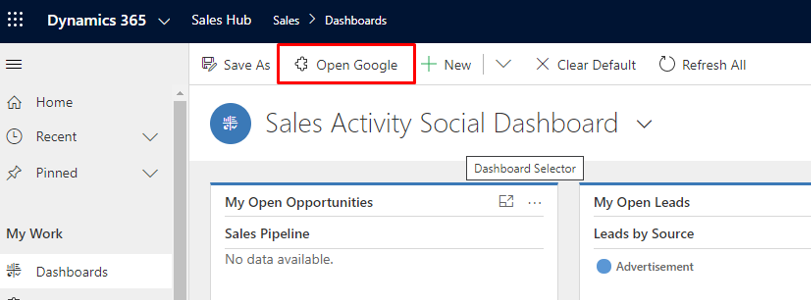
Custom buttons are not appearing in UCI

Microsoft have updated the Unified Interface’s UI with big improvements to the Sitemap and Command bar.
I have been facing this issue in unified interface, I did a lot of research on this and followed the below steps to resolve

We first need to get the organization id, this can be found in Settings > Customization's -> Developer Resources

or type the below command in Console
//Xrm.Utility.getGlobalContext().organizationSettings;
Xrm.Utility.getGlobalContext().organizationSettings.organizationId;

Open CRM Instance -- > Press F12 --> Console (execute the below scripts)

Xrm.WebApi.online.updateRecord("organization","{ORGANIZATIONID}", {"clientfeatureset":'<clientfeatures><clientfeature xmlns:xsd=\"http://www.w3.org/2001/XMLSchema\" xmlns:xsi=\"http://www.w3.org/2001/XMLSchema-Instance\"><name>FCB.ShellRefresh</name><value>true</value><location>Organization</location></clientfeature></clientfeatures>'})

Xrm.WebApi.online.updateRecord("organization", "{ORGANIZATIONID}", 
{'clientfeatureset':'<clientfeatures><clientfeature xmlns:xsd=\"http://www.w3.org/2001/XMLSchema\" xmlns:xsi=\"http://www.w3.org/2001/XMLSchema-Instance\"><name>FCB.DashboardCustomizableRibbon</name><value>true</value></clientfeature></clientfeatures>'})

Before executing Script


After executing the above script in Console window, we can see the button

E = "FCB.Client.Chart.DrillDown"
W = "FCB.DashboardCustomizableRibbon"
P = "FCB.DisableEditableGridControlOnPhone"
T = "FCB.LookupService"
N = "FCB.LookupQuickFind"

That’s it , your custom buttons will be available now in UCI.

Set Default View in CRM Subgrid


function subGridLookupView(){

debugger;
var subgrid= Xrm.Page.getControl("lookup_grdContacts");
if (subgrid!= null){
// you can add other conditions(subgrid!= 'undefined' || subgrid!='') as per your criteria 
//get the view ID from Advanced find Look for : View  and add the condition Name Equals "CustomContactsView"
Xrm.Page.getControl("lookup_ grdContacts ").setDefaultView("{00000000-0000-0000-0000-000000000000}");
                }
setTimeout(subGridLookupView, 1000);
}

Tuesday, May 19, 2020

Calling Workflow using JavaScript


var clientUrl = Xrm.Page.context.getClientUrl();
var workflowId = "workflow guid";
var entityId = "entityID";

var requestUri = clientUrl + "/api/data/v9.0/workflows(" + workflowId + ")/Microsoft.Dynamics.CRM.ExecuteWorkflow";

var xhr = new XMLHttpRequest();
xhr.open("POST", requestUri, true);
xhr.setRequestHeader("Accept", "application/json");
xhr.setRequestHeader("Content-Type", "application/json; charset=utf-8");
xhr.setRequestHeader("OData-MaxVersion", "4.0");
xhr.setRequestHeader("OData-Version", "4.0");
xhr.onreadystatechange = function () {
    if (this.readyState == 4) {
        xhr.onreadystatechange = null;
        if (this.status == 200) {
            var result = JSON.parse(this.response);
        } else {
            var error = JSON.parse(this.response).error;
        }
    }
};
xhr.send("{\"EntityId\":\"" + entityId + "\"}");


to get Workflow ID using Name
<fetch version="1.0" output-format="xml-platform" mapping="logical" distinct="false">
  <entity name="workflow">
    <filter type="and">
      <condition attribute="name" operator="eq" value="Enter Workflow Name Here!" />
    </filter>
  </entity>
</fetch>


Servicepointmanager does not support proxies with the https scheme


I started getting this in VS2015 on one of my machines. I had an additional package feed on myget which constantly asked me for credentials and failed even when entering correct credentials. 
What helped me was clearing the nuget cache and config by deleting these two nuget folders:
  1.          %APPDATA%\NuGet
  2.          %LOCALAPPDATA%\NuGet


After that I restarted Visual Studio and added my custom package source again.

Refresh CRM Page

Hard refresh CRM Page using the below scripts

window.location.reload(true);
//location.reload();

Wednesday, August 14, 2019

Set Default view in inline Lookup D365


function loadCustomDefaultView(){
debugger;
var subgrid= Xrm.Page.getControl("subgridname");
    if (subgrid != null || subgrid != 'undefined' || subgrid !='')) {
Xrm.Page.getControl("subgridname").setDefaultView("GUID");
   }
}

Update the content of Activated Quote in CRM


We got a situation as, the quote should activated for triggering a workflow and from workflow on based on some conditions we need to update the same quote. This is not possible as the quote becomes Read-Only immediately after you activate. 
 
If we want to update it, the option is revising the quote which closes the current quote and creates a new quote where we don't want to create new quotes.
 
After some search, we found a way for doing it and the way is very simple. Just change the state of quote to Draft, update the data and then change the quote state to Active which will not create any new quote.
 
We can do this using a system workflow and also from SDK.
 
System Workflow
 
SDK
// Change the Quote to Draft State
SetStateRequest draftQuote = new SetStateRequest();
draftQuote.EntityMoniker = new EntityReference("quote"newGuid(""));
draftQuote.State = new OptionSetValue(0); // Draft
draftQuote.Status = new OptionSetValue(1); // InProgress
objService.Execute(draftQuote);

// Update the Quote
Entity entQuote = new Entity("quote");
entQuote.Attributes["name"] = "testing1";
entQuote.Id = new Guid("DA5768B5-D62A-E511-80E0-FC15B4283778");
objService.Update(entQuote);

// Change the Quote to Active State.
SetStateRequest activateQuote = new SetStateRequest();
activateQuote.EntityMoniker = new EntityReference("quote"newGuid(""));
activateQuote.State = new OptionSetValue(1); // Active
activateQuote.Status = new OptionSetValue(2); // InProgress
objService.Execute(activateQuote);

Hope this helps.

Get AbsoluteURL from Document Locations in Dynamics 365

using System;
using System.Collections.Generic;
using System.Linq;
using System.Text;
using System.Threading.Tasks;
using Microsoft.Crm.Sdk.Messages;
using Microsoft.Xrm.Sdk;
using Microsoft.Xrm.Sdk.Workflow;
using System.Activities;

namespace DocumentLocationURL

{
    public class DocumentLocationURL : CodeActivity
    {
        #region "Parameter Definition"
        [Input("SharePointDocumentID")]
        [Default("")]
        public InArgument<string> SharePointDocumentID { get; set; }

        [Output("AbsoluteURL")]

        public OutArgument<string> AbsoluteURL { get; set; }

        protected override void Execute(CodeActivityContext executionContext)

        {
            #region "Load CRM Service from context"
            // Create the context
            IWorkflowContext context = executionContext.GetExtension<IWorkflowContext>();

            if (context == null)

                throw new InvalidPluginExecutionException("Failed to retrieve workflow context.");

            IOrganizationServiceFactory serviceFactory = executionContext.GetExtension<IOrganizationServiceFactory>();

            IOrganizationService service = serviceFactory.CreateOrganizationService(context.UserId);
            #endregion

            #region "Read Parameters"

            string _FieldName = this.SharePointDocumentID.Get(executionContext);
            EntityReference _Target = null;
            if (this.SharePointDocumentID.Get(executionContext) == null )
                throw new InvalidPluginExecutionException("Enter Target Input.");
           
            #endregion

            #region "AbsoluteURL Execution"

            RetrieveAbsoluteAndSiteCollectionUrlResponse retriveResponse = new RetrieveAbsoluteAndSiteCollectionUrlResponse();

            RetrieveAbsoluteAndSiteCollectionUrlRequest retrieveRequest = new RetrieveAbsoluteAndSiteCollectionUrlRequest

            {
                Target = new EntityReference("sharepointdocumentlocation", context.PrimaryEntityId)//this.SharePointDocumentID.Get(executionContext).Id)
            };
            retriveResponse = (RetrieveAbsoluteAndSiteCollectionUrlResponse)service.Execute(retrieveRequest);
            //throw new InvalidPluginExecutionException(retriveResponse.AbsoluteUrl.ToString());
            this.AbsoluteURL.Set(executionContext, retriveResponse.AbsoluteUrl.ToString());
            #endregion
            

        }

        #endregion

    }

}

Create  Workflow on Document Location entity Create/Update whichever meets to your requirement.

Click on "Add Step" and look for our assembly name i.e DocumentLocationURL, click on this DocumentLocationURL will appear, click on this to add step.

Add update step, and set AbsoluteURL field as DocumentLocationURL  (Output Parameter given in code).

Workflow is completed; save and activate it.

Tuesday, August 13, 2019

I came across a situation where we need to find the Custom Workflow activity across Processes, to achieve this we can add the Plugin assembly and look for dependencies that's not at all possible in all the cases. 

To overcome this, I had written below FetchXML and executed this in XRMToolBox-->FetchXML Tester

<fetch mapping="logical" count="5000" version="1.0" >
    <entity name="workflow" >
        <attribute name="name" />
        <attribute name="category" />
        <link-entity name="dependency" from="dependentcomponentobjectid" to="workflowid" alias="dep" >
            <link-entity name="plugintype" from="plugintypeid" to="requiredcomponentobjectid" alias="pt" >
                <attribute name="assemblyname" />
                <attribute name="description" />
                <attribute name="friendlyname" />
                <attribute name="name" />
                <attribute name="typename" />
                <attribute name="workflowactivitygroupname" />
                <attribute name="isworkflowactivity" />
            </link-entity>
        </link-entity>
    </entity>
</fetch>

Friday, July 27, 2018

Retrieve All Organizations in CRM

using Microsoft.Xrm.Sdk.Client;
using Microsoft.Xrm.Sdk.Discovery;
using System;
using System.Collections.Generic;
using System.Configuration;
using System.Net;
using System.ServiceModel.Description;

namespace GetAllOrganizations
{
    static class Program
    {
        private static string DiscoverServiceURL = ConfigurationManager.AppSettings["DiscoverServiceURL"];
        private static string UserName = ConfigurationManager.AppSettings["UserName"];
        private static string Password = ConfigurationManager.AppSettings["Password"];
        private static ClientCredentials credentials = new ClientCredentials();

        public static OrganizationServiceProxy GetOrganizationService(Organization selectedOrganization)
        {
            credentials.UserName.UserName = UserName;
            credentials.UserName.Password = Password;
            ServicePointManager.SecurityProtocol = SecurityProtocolType.Tls11 | SecurityProtocolType.Tls12;
            OrganizationServiceProxy serviceProxy = new OrganizationServiceProxy(new Uri(selectedOrganization.OrgServiceURL), null, credentials, null);
            return serviceProxy;
        }

        public static List<Organization> GetOrganizations()
        {
            credentials.UserName.UserName = UserName;
            credentials.UserName.Password = Password;
            ServicePointManager.SecurityProtocol = SecurityProtocolType.Tls11 | SecurityProtocolType.Tls12;
            using (var discoveryProxy = new DiscoveryServiceProxy(new Uri(DiscoverServiceURL), null, credentials, null))
            {
                discoveryProxy.Authenticate();

                // Get all Organizations using Discovery Service
                RetrieveOrganizationsRequest retrieveOrganizationsRequest = new RetrieveOrganizationsRequest()
                {
                    AccessType = EndpointAccessType.Default,
                    Release = OrganizationRelease.Current
                };

                RetrieveOrganizationsResponse retrieveOrganizationsResponse =
                (RetrieveOrganizationsResponse)discoveryProxy.Execute(retrieveOrganizationsRequest);

                if (retrieveOrganizationsResponse.Details.Count > 0)
                {
                    var orgs = new List<Organization>();
                    foreach (OrganizationDetail orgInfo in retrieveOrganizationsResponse.Details)
                    {
                        string orgServUrl = string.Empty;
                        orgInfo.Endpoints.TryGetValue(EndpointType.OrganizationService, out orgServUrl);
                        orgs.Add(new Organization()
                        {
                            OrgFriendlyName = orgInfo.FriendlyName,
                            OrgUniqueName = orgInfo.UniqueName,
                            OrgServiceURL = orgServUrl
                        });
                    }
                    return orgs;
                }
                else
                    return null;
            }
        }
    }

    public class Organization
    {
        public string OrgFriendlyName { get; set; }
        public string OrgUniqueName { get; set; }
        public string OrgServiceURL { get; set; }
    }
}

ExecuteMultiple in Dynamics CRM/Retrieve All Records in Dynamics FetchXML

using System;
using System.Collections.Generic;
using System.Linq;
using System.Text;
using System.Threading.Tasks;
using Microsoft.Xrm.Sdk;
using Microsoft.Xrm.Sdk.Client;
using Microsoft.Xrm.Sdk.Messages;
using Microsoft.Xrm.Sdk.Query;
using System.Collections;
using System.Configuration;
using System.ServiceModel;
using System.ServiceModel.Description;
using System.Globalization;
using System.IO;

namespace Timer_for_Accounts
{
    class Program
    {
        public static void Main(string[] args)
        { 
            string strLogText = "Execution Started at :" + DateTime.Now;
            Console.WriteLine("Execution Started..");
            ClientCredentials Credentials = new ClientCredentials();
//Retrieve UserName and Password from App.config
            Credentials.UserName.UserName = ConfigurationManager.AppSettings["UserName"];
            Credentials.UserName.Password = ConfigurationManager.AppSettings["Password"];
            string uri = ConfigurationManager.AppSettings["uri"];
            OrganizationServiceProxy serviceProxy = new OrganizationServiceProxy(new Uri(uri), null, Credentials, null);
            Console.WriteLine("Connected to Server Successfully.");
            //WE NEED TO USE {0} IN FETCHXML WHEN YOU WANT TO RETRIEVE ALL RECORDS
            var fetch = "<fetch {0} version='1.0' output-format='xml-platform' mapping='logical' distinct='false'>" +
                                "  <entity name='new_account'>" +
                                "    <attribute name='new_name' />" +
                                "    <attribute name='ownerid' />" +
                                "    <attribute name='createdon' />" +
                                "    <attribute name='createdby' />" +
                                "    <attribute name = 'modifiedon' />" +
                                "    <order attribute='createdon' descending='true' />" +
                                "      <filter type='and'>" +
                                "        <condition attribute='statecode' operator='eq' value='0' />" +
                                "      </filter>" +
                                "  </entity>" +
                                "</fetch>";
            EntityCollection recordstobeupdated = new EntityCollection();
            var accountRecords = RetrieveAllRecords(serviceProxy, fetch);
            for (int accountCount = 0; accountCount < accountRecords.Count; accountCount++)
            {
                recordstobeupdated.Entities.Add(accountRecords[accountCount]);
            }
            #region ExecuteMultiple to update records
            EntityCollection updateRecords = recordstobeupdated;
            ExecuteMultipleRequest requestForUpdates = new ExecuteMultipleRequest()
            {
                Requests = new OrganizationRequestCollection()
            };
            try
            {
                int remainingcount = updateRecords.Entities.Count % 100; ;
                int count = 0;
                int updatedcount = 0;
                requestForUpdates.Settings = new ExecuteMultipleSettings();
                requestForUpdates.Settings.ContinueOnError = true;
                requestForUpdates.Settings.ReturnResponses = true;
                Console.WriteLine("Started at :" + DateTime.Now.ToString());
                foreach (var entity in updateRecords.Entities)
                {
                    TimeSpan difference = DateTime.Now - (DateTime)entity.Attributes["createdon"];

                    int DifferenceDays = difference.Days + 1;
                    entity.Attributes["new_accountCountopendays"] = DifferenceDays;
                    UpdateRequest updateRequest = new UpdateRequest { Target = entity };
                    requestForUpdates.Requests.Add(updateRequest);
                    count = count + 1;
                    if (requestForUpdates.Requests.Count == 100)
                    {
                        //WE ARE EXECUTING 100 RECORDS AT A TIME YOU CAN INCREASE THE COUNT BASED ON YOUR REQUIREMENT
                        serviceProxy.Execute(requestForUpdates);
                        updatedcount = updatedcount + 100;
                        Console.WriteLine("Updated :" + updatedcount);
                        Console.WriteLine("Completed at :" + DateTime.Now.ToString());
                        requestForUpdates.Requests = new OrganizationRequestCollection();
                        count = 0;
                    }
                }
                if (count == remainingcount)
                {
                    serviceProxy.Execute(requestForUpdates);
                    int totalcounnt = updatedcount + count;
                    Console.WriteLine("Updated Remaining:" + totalcounnt);
                    requestForUpdates.Requests = new OrganizationRequestCollection();
                }
            }
            catch (System.ServiceModel.FaultException<OrganizationServiceFault> ex)
            {
                Console.WriteLine("Update request failed for the account{0} and the reason being: {1}",
                    ((ExecuteTransactionFault)(ex.Detail)).FaultedRequestIndex + 1, ex.Detail.Message);
            }
            #endregion ExecuteMultiple for update records
        }

        public static List<Entity> RetrieveAllRecords(IOrganizationService service, string fetch)
        {
            var moreRecords = false;
            int page = 1;
            var cookie = string.Empty;
            List<Entity> Entities = new List<Entity>();
            do
            {
                var xml = string.Format(fetch, cookie);
                var collection = service.RetrieveMultiple(new FetchExpression(xml));
                if (collection.Entities.Count >= 0) Entities.AddRange(collection.Entities);
                moreRecords = collection.MoreRecords;
                if (moreRecords)
                {
                    page++;
                    cookie = string.Format("paging-cookie='{0}' page='{1}'", System.Security.SecurityElement.Escape(collection.PagingCookie), page);
                }
            } while (moreRecords);
            return Entities;
        }
    }
}

Script to exclude Weekends and Public Holidays in SSRS

=IIF(DateValue(Fields!createdon.Value)=DateValue(Fields!modifiedon.Value),"0",
(DateDiff(DateInterval.day, DateValue(Fields!createdon.Value), DateValue(Fields!modifiedon.Value)))
- (DateDiff(DateInterval.WeekOfYear, DateValue(Fields!createdon.Value), DateValue(Fields!modifiedon.Value))*2)
- IIF(Weekday(DateValue(Fields!createdon.Value),1) = 1,1,0)
- IIF(Weekday(DateValue(Fields!createdon.Value),1) = 7,1,0)
- IIF(Weekday(DateValue(Fields!modifiedon.Value),1) = 1,1,0)
- IIF(Weekday(DateValue(Fields!modifiedon.Value),1) = 7,1,0)
-IIF(DateValue(Fields!createdon.Value)<=DateValue("January 01, 2017") and DateValue("January 01, 2017") <=DateValue(Fields!modifiedon.Value),1,0)
)

Tuesday, March 27, 2018

Check if Case contains Note/Annotation in Dynamics CRM


            IPluginExecutionContext context = (IPluginExecutionContext)serviceProvider.GetService(typeof(IPluginExecutionContext));

            // Obtain the organization service reference.
            IOrganizationServiceFactory serviceFactory = (IOrganizationServiceFactory)serviceProvider.GetService(typeof(IOrganizationServiceFactory));
            IOrganizationService service = serviceFactory.CreateOrganizationService(context.UserId);
           
            // ITracingService tracingService = (ITracingService)serviceProvider.GetService(typeof(ITracingService));
            if (context.InputParameters.Contains("IncidentResolution") && context.InputParameters["IncidentResolution"] is Entity)
            {
                
                Entity incidentResolution = (Entity)context.InputParameters["IncidentResolution"];
                Guid relatedIncidentGuid = ((EntityReference)incidentResolution.Attributes["incidentid"]).Id;

               
                QueryExpression NotesQE = new QueryExpression { EntityName = "annotation", ColumnSet = new ColumnSet(true) };
                LinkEntity incident = new LinkEntity
                {
                    LinkFromEntityName = "annotation", //annotation
                    LinkToEntityName = "incident", //Case
                    LinkFromAttributeName = "objectid", 
                    LinkToAttributeName = "incidentid"
                };
                OrderExpression orderbycreatedon = new OrderExpression("createdon", OrderType.Descending);
                incident.LinkCriteria.AddCondition("incidentid", ConditionOperator.Equal, relatedIncidentGuid);
                NotesQE.Orders.Add(orderbycreatedon);
                NotesQE.LinkEntities.Add(incident);
                EntityCollection NotesRetrieveQE = service.RetrieveMultiple(NotesQE);
                
                    if (NotesRetrieveQE != null && NotesRetrieveQE.Entities.Count > 0 && NotesRetrieveQE.Entities[0].Attributes.Contains("filename"))
                    {
                        String filename = NotesRetrieveQE.Entities[0].Attributes["filename"].ToString();
                        string[] splitfilename = filename.Split('.');
                        if (splitfilename[splitfilename.Length - 1] == "pdf")
                        { return; }
                        else
                        {
                            throw new InvalidPluginExecutionException("Notes not Found.");
                        }
                    }
                    else
                    {
                        throw new InvalidPluginExecutionException("Notes not Found.");
                    }            
            }

Wednesday, March 21, 2018

Deactivate a record using Plugin in D365

//Deactivate a record
        public static void DeactivateRecord(string entityName, Guid recordId, IOrganizationService organizationService)
        {
            var cols = new ColumnSet(new[] { "statecode", "statuscode" });
            //Check if it is Active or not
            var entity = organizationService.Retrieve(entityName, recordId, cols);
            if (entity != null && entity.GetAttributeValue<OptionSetValue>("statecode").Value == 0)
            {
                //StateCode = 1 and StatusCode = 2 for deactivating Account or Contact
                SetStateRequest setStateRequest = new SetStateRequest()
                {
                    EntityMoniker = new EntityReference
                    {
                        Id = recordId,
                        LogicalName = entityName,
                    },
                    State = new OptionSetValue(1),
                    Status = new OptionSetValue(2)
                };
                organizationService.Execute(setStateRequest);
            }
        }

Sample Console Application to connect to Dynamics 365

using Microsoft.Xrm.Sdk;
using Microsoft.Xrm.Sdk.Messages;
using Microsoft.Xrm.Sdk.Metadata;
using Microsoft.Xrm.Sdk.Query;
using Microsoft.Xrm.Tooling.Connector;
using System;
using Microsoft.Xrm.Sdk.Client;
using System.Collections.Generic;
using System.Linq;
using System.Text;
using System.Threading.Tasks;
using Microsoft.Crm.Sdk.Messages;
using System.ServiceModel.Description;
using System.Data;
using System.ComponentModel;
using System.IO;
using Microsoft.Xrm.Client.Services;
using Microsoft.Xrm.Client;

namespace SampleConsoleApplication
{
    class Program
    {
        static void Main(string[] args)
        {
            try
            {
  //you can add the dlls from nuget package manager
                //In Solution Explorer, right - click either References or a project and select Manage NuGet Packages....
                //The Browse tab displays packages by popularity from the currently selected source
                //Select the desired version from the drop-down and select Install.Visual Studio installs the package and its dependencies into the project.You may be asked to accept license terms. When installation is complete, the added packages appear on the Installed tab. Packages are also listed in the References node of Solution Explorer

               
                // for CRM online instance
                ClientCredentials Credentials = new ClientCredentials();
                Credentials.UserName.UserName = "username";
                Credentials.UserName.Password = "password";

                string connectionString = "Url=https://domainname.crm.dynamics.com; Username=username; Password=password; authtype=Office365";
                CrmServiceClient conn = new Microsoft.Xrm.Tooling.Connector.CrmServiceClient(connectionString);
                var serviceProxyPROD1 = (IOrganizationService)conn.OrganizationWebProxyClient != null ? (IOrganizationService)conn.OrganizationWebProxyClient : (IOrganizationService)conn.OrganizationServiceProxy;
            ServicePointManager.SecurityProtocol = SecurityProtocolType.Tls12;

                var serviceProxyPRODOnline = conn.OrganizationServiceProxy;

                //try to fetch any record from CRM I am fetching case record here
                Entity incidentrecord = serviceProxyPROD1.Retrieve("incident", new Guid("A2BDAA1F-E711-E611-80F1-480FCFF4B5B1"), new Microsoft.Xrm.Sdk.Query.ColumnSet("title"));

                ////To run Action from C#
                OrganizationRequest organizationRequest = new OrganizationRequest("rollbackname");
                organizationRequest["Target"] = new EntityReference("incident", Guid.Parse("A2BDAA1F-E711-E611-80F1-480FCFF4B5B1"));
                OrganizationResponse organizationResponse = serviceProxyPRODOnline.Execute(organizationRequest);

                //Create View from Console Application
                var fetchXML = "<fetch distinct='true' mapping='logical' output-format='xml-platform' version='1.0' >";
                fetchXML += "  <entity name='incident' >";
                fetchXML += "    <attribute name='title' />";
                fetchXML += "    <attribute name='ticketnumber' />";
                fetchXML += "    <link-entity name='annotation' from='objectid' to='incidentid' alias='an'  link-type='outer'>";
                fetchXML += "      <attribute name='objectid' />";
                fetchXML += "      <filter type='and' >";
                fetchXML += "        <condition attribute='isdocument' value='0' operator='eq' />";
                fetchXML += "      </filter>";
                fetchXML += "    </link-entity>";
                fetchXML += "    <filter type='and' >";
                fetchXML += "      <condition entityname='an' attribute='objectid' operator='null' />";
                fetchXML += "    </filter>";
                fetchXML += "  </entity>";
                fetchXML += "</fetch>";

                Entity entity = new Entity("savedquery");
                entity["name"] = "Cases with Attachments";
                entity["fetchxml"] = fetchXML;
                entity["returnedtypecode"] = "incident";
                entity["querytype"] = 0;
                serviceProxyPROD1.Create(entity);
            }
            catch (Exception ex)
            {
                Console.WriteLine(ex.Message);
            }
        }
    }
}