Tuesday, June 9, 2020

Invalid Argument. : System.ArgumentOutOfRangeException: Specified argument was out of the range of valid values.

Recently I came across this issue while importing solutions from Dev to Prod (Importing UCI changes from Dev to Prod)

The solution failed with same error: Specified argument was out of the range of valid values. Parameter name: Default picklist value has to be one of the option values.

I have thoroughly went through all my optionssets and found the below useful information

Error : Invalid Argument. : System.ArgumentOutOfRangeException: Specified argument was out of the range of valid values. Parameter name: Picklist option with value (864630000) that has the parent OptionSet with (guid) id does not exist. Default picklist value has to be one of the option values.

To find the offending option set I took the Option Value {864630000} and looked for that value within the customizations.xml file

the value should be under <attribute> tag on xml where the type is picklist(<Type>picklist</Type>), under <attribute> tag you will find <AppDefaultValue> tag which stored the default picklist value, check if the default value is part of the optionset value or not. If not add a value with 864630000 under the mentioned option set --> Save --> re-import the solution

Ex: in my scenario I have searched for  <AppDefaultValue>864630000</AppDefaultValue> from this grab the Picklist Attribute, check if that attribute has 864630000 value

Another way is you can change the default value to other existing value in customizations.xml or change the value in CRM  to unassigned value --> Save --> Publish.

it will make easier if you know the entity that trigger the error, you just need to check on that entity scope <Entity></Entity>..

Hope this will help you in finding the wrong picklist value using AppDefaultValue..

Wednesday, May 20, 2020

Custom buttons are not appearing in UCI

Microsoft have updated the Unified Interface’s UI with big improvements to the Sitemap and Command bar.
I have been facing this issue in unified interface, I did a lot of research on this and followed the below steps to resolve

We first need to get the organization id, this can be found in Settings > Customization's -> Developer Resources

or type the below command in Console
//Xrm.Utility.getGlobalContext().organizationSettings;
Xrm.Utility.getGlobalContext().organizationSettings.organizationId;

Open CRM Instance -- > Press F12 --> Console (execute the below scripts)

Xrm.WebApi.online.updateRecord("organization","{ORGANIZATIONID}", {"clientfeatureset":'<clientfeatures><clientfeature xmlns:xsd=\"http://www.w3.org/2001/XMLSchema\" xmlns:xsi=\"http://www.w3.org/2001/XMLSchema-Instance\"><name>FCB.ShellRefresh</name><value>true</value><location>Organization</location></clientfeature></clientfeatures>'})

Xrm.WebApi.online.updateRecord("organization", "{ORGANIZATIONID}", 
{'clientfeatureset':'<clientfeatures><clientfeature xmlns:xsd=\"http://www.w3.org/2001/XMLSchema\" xmlns:xsi=\"http://www.w3.org/2001/XMLSchema-Instance\"><name>FCB.DashboardCustomizableRibbon</name><value>true</value></clientfeature></clientfeatures>'})

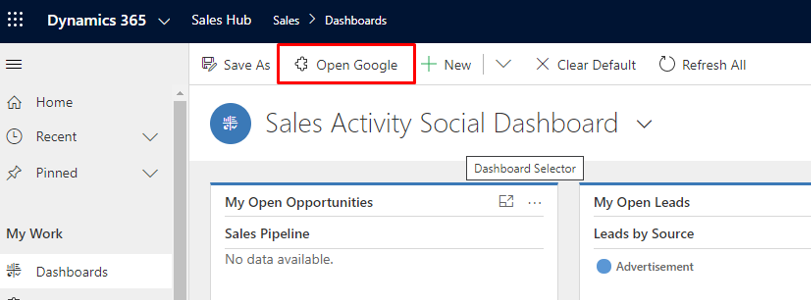
Before executing Script


After executing the above script in Console window, we can see the button

E = "FCB.Client.Chart.DrillDown"
W = "FCB.DashboardCustomizableRibbon"
P = "FCB.DisableEditableGridControlOnPhone"
T = "FCB.LookupService"
N = "FCB.LookupQuickFind"

That’s it , your custom buttons will be available now in UCI.

Set Default View in CRM Subgrid


function subGridLookupView(){

debugger;
var subgrid= Xrm.Page.getControl("lookup_grdContacts");
if (subgrid!= null){
// you can add other conditions(subgrid!= 'undefined' || subgrid!='') as per your criteria 
//get the view ID from Advanced find Look for : View  and add the condition Name Equals "CustomContactsView"
Xrm.Page.getControl("lookup_ grdContacts ").setDefaultView("{00000000-0000-0000-0000-000000000000}");
                }
setTimeout(subGridLookupView, 1000);
}

Tuesday, May 19, 2020

Calling Workflow using JavaScript


var clientUrl = Xrm.Page.context.getClientUrl();
var workflowId = "workflow guid";
var entityId = "entityID";

var requestUri = clientUrl + "/api/data/v9.0/workflows(" + workflowId + ")/Microsoft.Dynamics.CRM.ExecuteWorkflow";

var xhr = new XMLHttpRequest();
xhr.open("POST", requestUri, true);
xhr.setRequestHeader("Accept", "application/json");
xhr.setRequestHeader("Content-Type", "application/json; charset=utf-8");
xhr.setRequestHeader("OData-MaxVersion", "4.0");
xhr.setRequestHeader("OData-Version", "4.0");
xhr.onreadystatechange = function () {
    if (this.readyState == 4) {
        xhr.onreadystatechange = null;
        if (this.status == 200) {
            var result = JSON.parse(this.response);
        } else {
            var error = JSON.parse(this.response).error;
        }
    }
};
xhr.send("{\"EntityId\":\"" + entityId + "\"}");


to get Workflow ID using Name
<fetch version="1.0" output-format="xml-platform" mapping="logical" distinct="false">
  <entity name="workflow">
    <filter type="and">
      <condition attribute="name" operator="eq" value="Enter Workflow Name Here!" />
    </filter>
  </entity>
</fetch>


Servicepointmanager does not support proxies with the https scheme


I started getting this in VS2015 on one of my machines. I had an additional package feed on myget which constantly asked me for credentials and failed even when entering correct credentials. 
What helped me was clearing the nuget cache and config by deleting these two nuget folders:
  1.          %APPDATA%\NuGet
  2.          %LOCALAPPDATA%\NuGet


After that I restarted Visual Studio and added my custom package source again.

Refresh CRM Page

Hard refresh CRM Page using the below scripts

window.location.reload(true);
//location.reload();

Wednesday, August 14, 2019

Set Default view in inline Lookup D365


function loadCustomDefaultView(){
debugger;
var subgrid= Xrm.Page.getControl("subgridname");
    if (subgrid != null || subgrid != 'undefined' || subgrid !='')) {
Xrm.Page.getControl("subgridname").setDefaultView("GUID");
   }
}